
Configuring PrinterOn to authenticate using AAA Login
The PrinterOn AAA Login authentication method uses a designated web service to perform user authentication. When enabled, all other authentication methods are deactivated.

Note:
To use this authentication method, you must integrate with PrinterOn’s Job Accounting API.
When using AAA Login authentication, the authentication service must not reside on a host
that resolves to an IPv6 address. PrinterOn does not yet support IPv6 for this feature.
📘 Instructions
To configure the authentication behavior for an AAA Login:
On the Authentication tab, select AAA Login (Custom) as your Authentication method. The Custom User Authentication Settings panel appears.
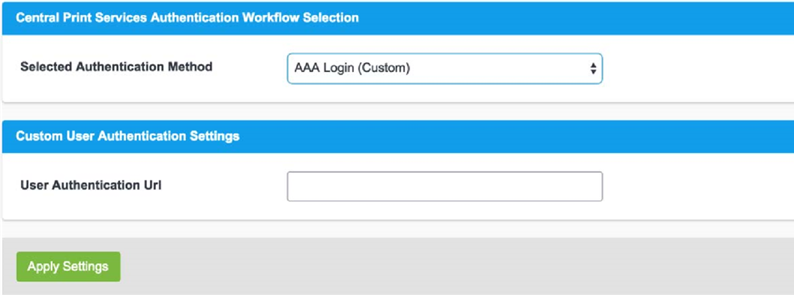
In the User Authentication URI field, specify the URL of the web service performing the authentication. The PrinterOn Server redirects users to this URL during login.
Note:
This authentication scheme must be configured in conjunction with PrinterOn’s hosted configuration interface.
PrinterOn does not support IPv6 for this field. The authentication service must not reside on a host that resolves to an IPv6 address.
In the Authentication Behavior panel (visible only when Advanced Settings is enabled), configure the following settings as necessary:
Guest Login Enabled: When enabled, specifies that unauthenticated users are permitted to print. When guest login is enabled, you must also configure guest identification and designate one or more printers as guest printers. For more information, see Configuring guest printing.
Trusted Application Behavior (Advanced view only): Defines the minimum authentication requirements for users printing through the Print Delivery Gateway (PDG) using the Google Cloud Print workflow. For more information, see Configuring authentication requirements for Google Cloud Print users.
Click Apply Settings.